Leadguru Sources is a new way to start using Leadguru without setting up your own community accounts. Instead of registering on Slack, Discord, and Telegram, joining the right communities, and connecting your own accounts, you can now get real-time lead alerts from 500+ admin-owned communities that Leadguru already monitors — and create monitoring rules within minutes of signing up. The result is a reduction in time-to-first-signal from days to minutes. The change is free for every Leadguru user on every plan.
The shift in B2B community monitoring mirrors the broader shift in buying behavior. [Kondo State of B2B Sales, 2026]: 78% of social sellers outsell peers who don’t use social media, and top social sellers create 45% more opportunities per quarter — much of it because they catch buying intent in private communities within hours, not days. [Gartner, 2025]: 63% of high-performing sales organizations now use AI to prioritize which accounts to target. Speed and signal-source coverage are the two operational variables that determine whether community-based prospecting produces pipeline or produces nothing. Sources is our response to both.
What’s new: 500+ communities, zero setup
Leadguru’s previous onboarding required the user to bring their own community footprint: sign up, find relevant communities, join them, connect accounts, define rules, then start seeing signals. For an early-stage team, this could take 2-5 days. For a larger team with existing Slack and Discord memberships, it took 1-2 days.
Sources inverts the model. Leadguru already maintains 500+ admin-owned communities across Slack, Discord, and Telegram, covering B2B SaaS, developer tools, fintech, marketing, sales, and adjacent verticals. All of them are visible in the Sources catalog, and every user can browse them from day one. Users select which communities they actually want to monitor — the full catalog is browsable, but the user picks the subset that matches their ICP. This is important: monitoring 500+ communities would consume credits on every message across all of them, and most users only need a curated subset. Sources gives you the catalog and the choice.
Once the user has picked the communities they want to monitor, the rest of the workflow is identical to the existing monitoring-rules flow. The user experience is now:
- Sign up for Leadguru (under 60 seconds).
- Browse the Sources catalog and select the communities that match your ICP (5-10 minutes).
- Create a monitoring rule (AI prompt, keyword rule, or both).
- Receive real-time matched signals from the selected communities.
From signup to first signal: minutes, depending on how carefully the user sets up their rule. From signup to first booked meeting: 2-4 weeks of signal accumulation, depending on volume and reply workflow.
How Sources works
Step 1: Sign up and create your account
Standard Leadguru sign-up — email, password, optional SSO via Google or Microsoft. No payment information required for the free tier; the new Sources feature is available immediately on every plan, including the free trial.
Step 2: Browse the Sources catalog and select your communities
The Sources catalog is the list of 500+ admin-owned communities Leadguru monitors. All of them are visible to every user — there is no plan-tier cap on browsing or on the catalog size. Each community entry shows:
- Platform: Slack, Discord, or Telegram
- Topic area: B2B SaaS founders, dev tools, fintech founders, marketing leaders, sales operators, etc.
- Member count: typical range 200-10,000
- Activity level: average daily messages (a proxy for signal density)
- Open to invites: whether Slack communities will accept new member requests through Leadguru
You select the subset of communities you actually want to monitor. The full catalog is the menu, not the default subscription. Most users start with 10-30 communities that closely match their ICP, then expand as they refine their monitoring rules and reply capacity. Monitoring credits are spent only on the communities you have selected, so a curated 20-community selection produces more relevant signals per credit than a blanket selection of all 500+.
Step 3: Create a monitoring rule
A monitoring rule tells Leadguru which messages to surface from the Sources you’ve selected. Three rule types are available:
- AI prompt rule: natural-language description of your ideal lead (e.g., “B2B SaaS founders in fintech looking for outsourced growth help, who have raised a Series A in the last 12 months”). The AI classifier scores each message in your selected Sources against the prompt.
- Keyword rule: exact keyword combinations (e.g., “looking for” + “CRM” + “Series A”). No AI credits consumed — pure text matching.
- Mixed rule: keywords as a first filter, AI evaluates the filtered set. Best of both — fast filtering plus high-quality scoring.
Most users start with a mixed rule to see the trade-off between volume and precision, then refine over the first 1-2 weeks based on which signals convert.
Step 4: Receive real-time matched signals
Once a rule is active, matched messages stream into a unified inbox within seconds of being posted. Each match includes:
- The original message (with author, channel, timestamp)
- The AI intent score (0-100)
- The matching rationale (which phrases triggered the match)
- Author identity: real name, current role, company, LinkedIn URL (resolved from public profile data)
- Reply suggestions generated by AI in your voice and tone
The reply is yours to send — Leadguru does not post on your behalf. The next section explains how the reply workflow works for each platform.
How reply works across platforms
The reply workflow depends on the platform of the source community. Leadguru surfaces the signal; you decide how to respond.
Telegram and Discord: direct reply from your own account
Telegram and Discord both allow any user with a valid account to send a direct message to another user on the platform, regardless of whether they share a server or channel. Once a signal is matched, you can:
- Open the signal in Leadguru’s inbox.
- Click “Reply” to draft a message (or use the AI-suggested reply).
- Send the message directly from your connected Telegram or Discord account.
If you don’t have a connected Telegram or Discord account yet, the connection flow is unchanged from the previous version of Leadguru: OAuth for Discord, read-only API token for Telegram. Connection takes under 2 minutes.
Slack: register, then reply from your workspace
Slack’s permissions model is different from Telegram and Discord. Direct messages to another user only work if both users are members of the same Slack workspace, or if the workspace is part of a Slack Enterprise Grid where cross-workspace DMs are enabled. For most B2B Slack communities, neither is the case.
When you save a lead from a Slack source, the workflow is:
- Click Get invite link. Leadguru sends you a Slack invite to the source community, and the same invite is tied to the email address you used to sign up for Leadguru. Tip: register on multiple Slack communities with the same email address so it’s easier to connect your account to Leadguru and reply to leads without switching profiles.
- Add your Slack account in the Leadguru Connections section.
- Once your account is connected, the send message action becomes available, and you can DM the lead directly from your Slack workspace.
When the invite link is not available
If the Get invite link button is missing or fails, some Slack communities only grant access after an introduction to the admin team. In those cases, email [email protected] and we will reach out to the admins on your behalf and send you the invite ourselves. The turnaround is usually 1–2 days depending on the community’s response time.
While you wait, you don’t have to lose the lead. Each Slack signal comes with the author’s real name and LinkedIn profile, so you can search for them on LinkedIn and send a connection request with a short note referencing the conversation you saw. This is the practical workaround until your Slack invite arrives.
Before vs after: the onboarding change
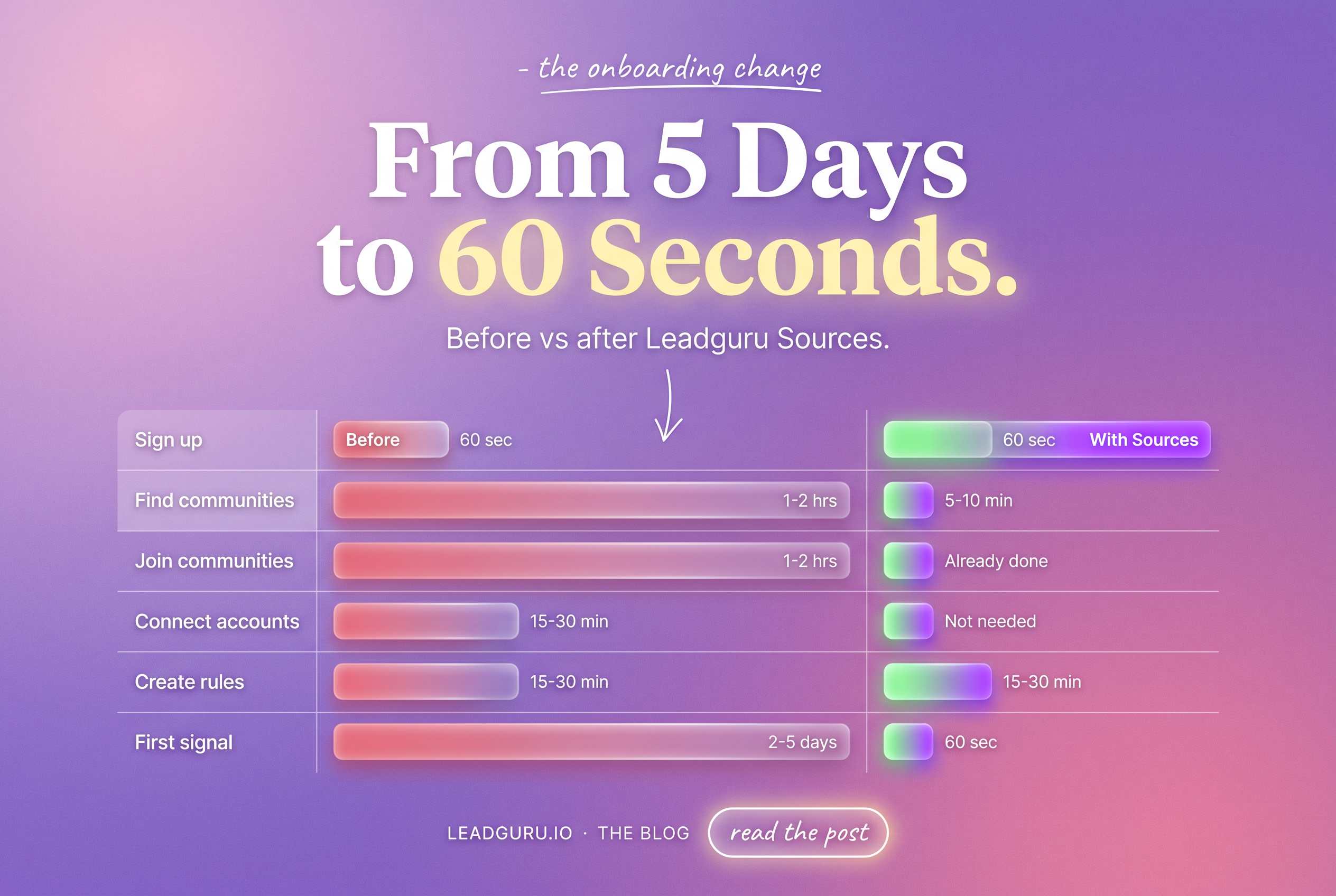
The total time-to-first-signal drops from 2-5 days to under 5 minutes. The reply SLA — the 4-hour window from signal to first reply — now starts on day 1 instead of day 3.
Pricing and availability
Sources is free for every Leadguru user on every plan, including the free trial. There is no separate Sources tier or add-on. The full 500+ community catalog is visible to every user; you select which subset of communities you actually monitor. The plan tier still determines the number of monitoring rules, the volume of AI-evaluated signals, and the limits on your reply workflow — but it does not cap your access to the Sources catalog itself.
This is a permanent change, not a launch promotion. Sources is now the default onboarding experience for new users; existing users see Sources as a new addition to their existing community sources.
How this fits the rest of Leadguru
Sources is the third signal-input option in Leadguru, alongside:
- Connected personal accounts — the original onboarding. The user connects their own Slack, Discord, and Telegram accounts and monitors communities they are already a member of.
- Connected team accounts — for sales teams with multiple operators, each operator connects their own accounts and results roll up to a shared pipeline.
- Sources — Leadguru’s admin-owned communities. No account connection required.
Most users will use a combination. Sources gives immediate coverage from day 1. Connected personal accounts give long-term expansion as the user grows their own community footprint. The two complement each other: Sources is breadth, personal accounts are depth.
For a step-by-step on setting up monitoring rules against any source — personal or admin-owned — see how to identify and respond to buying signals. For the broader framework on what buying intent looks like across stages, see what buying intents actually look like across the four stages. For a community-discovery workflow that supplements Sources with your own memberships, see how to find B2B communities on Telegram, Slack, and Discord. For the historical-archive scanning feature, see how Deep Research finds high-intent leads in message archives.
Frequently Asked Questions
What is Leadguru Sources?
Sources is a feature that gives Leadguru users immediate access to 500+ admin-owned communities across Slack, Discord, and Telegram without connecting their own accounts. Users select the communities relevant to their ICP from a catalog, create monitoring rules, and start receiving real-time matched signals within minutes of signing up. Sources is free for every Leadguru user on every plan, including the free trial.
Do I need to connect my own Slack, Discord, or Telegram accounts to use Sources?
No. Sources works entirely through Leadguru’s admin-owned community accounts. You do not need to register on any platform, join any community, or connect any account to start receiving signals. If you want to reply to a matched signal in Telegram or Discord, you need to connect your own account to send a direct message; for Slack, you request an invite to the source community and reply from your new membership there. Most users start with Sources and add personal accounts later as they grow their own community footprint.
How long does it take to start getting leads from Sources?
From signup to first matched signal: 60 seconds to 5 minutes, depending on how carefully you set up your monitoring rule. The rule-creation step is the same as the previous workflow — the difference is that you skip the days-long account-connection and community-discovery phases. From first signal to first booked meeting: 2-4 weeks of signal accumulation, depending on volume and reply workflow.
How is the reply workflow in Slack if I am not a member of the workspace?
Leadguru sends you a Slack invite to the source community within 1 business hour of your request. After you accept the invite and join the workspace, you can send DMs to other members. If you need to reply before the invite arrives, the practical workaround is to reach out via LinkedIn using the profile Leadguru already resolved — most B2B Slack communities require real names, so the LinkedIn profile typically matches the Slack display name.
Will Sources change Leadguru’s pricing?
No. Sources is included in every existing plan, including the free trial, at no additional cost. The full 500+ community catalog is visible to every user, and you select which subset to monitor. The plan tier still determines the number of monitoring rules, the volume of AI-evaluated signals, and the limits on your reply workflow — but it does not cap access to the Sources catalog or how many communities you can monitor.